6 Best Treadmills for Apple Fitness+ (November 2026)
The best treadmills for Apple Fitness+ include the NordicTrack T Series Treadmills for Home for iFIT and Apple Health users, the CURSOR FITNESS 15%/16% Incline Treadmills for Home for high-capacity walking workouts, and the ProForm Carbon Treadmills for compact guided workouts.
On this page (4 sections)
The best treadmill for Apple Fitness workouts is the Horizon Fitness Treadmill because it connects with Apple Watch and iPhone and has a 20 x 60 in cushioned deck. It also works with several fitness apps, which gives you more options beyond Apple Fitness+.
Apple Fitness+ runs on your own Apple device. Your treadmill therefore needs a comfortable surface for walking, jogging or running, and it should fit how you follow the class and track data.
NordicTrack and ProForm suit users who want iFIT automation and Apple Health syncing. Their 0 to 10 MPH speed and 0 to 10 percent incline cover most general workouts, and automatic changes can follow an instructor without constant button presses.
Smaller models take less floor space and fold away more easily. That usually means a shorter or narrower deck, so they suit shorter strides and steady walking more than fast running.
Deck size deserves an early check. A 20 x 60 in deck gives the most room for longer strides, while a 55 in deck is a practical middle ground for mixed walking and jogging.
Speed and incline should match your goals. A 12 MPH top speed suits stronger runners, while 8 MPH suits many walking and interval sessions, and higher incline mainly helps hill work.
Connection type matters as much as the hardware. A treadmill that pairs with Apple Watch or iPhone can simplify tracking, while a model that syncs through another app may still require manual adjustments during an Apple Fitness workout.
If a built-in display matters, compare these picks with our guide to the Best Treadmill With Screen. For broader connected training, our Best Smart Treadmill guide covers other features that may affect your choice.
Storage should also shape your decision. A foldable frame helps in a shared room, but you still need space to unfold it, step on safely and see your Apple device clearly.
In short, choose based on how you follow classes, how you prefer data to be tracked and how much room you have at home. The sections below break down those trade-offs by model.
Our picks at a glance
-
1
 Best for iFIT and Apple Health users
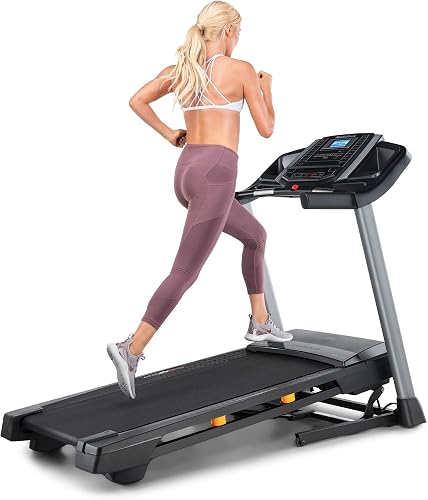
NordicTrack T Series Treadmills for Home
9.7/10 our score
See it on Amazon -
2
 Best for high-capacity walking workouts
CURSOR FITNESS 15%/16% Incline Treadmills for Home
9.6/10 our score
See it on Amazon -
3

- 4
 Best for direct Apple Watch connectionCheck it
- 5
 Check it
UMAY Fitness 20% Auto InclineTreadmill
Best for steep incline intervals - 6
 Check it
Sunny Health & Fitness Smart Foldable Incline
Best for Bluetooth beginners
Which treadmill is best for Apple Fitness+?
The Horizon Fitness Treadmill is the best overall fit for Apple Fitness users because its stated features include Apple Watch and iPhone connection. NordicTrack and ProForm follow closely when you want Apple Health syncing alongside automatic speed and incline changes through iFIT.
We compared the stated deck sizes, speed ranges, incline systems, folding designs and connection features against the needs of Apple Fitness workouts. Our score weighs specs, features and buyer feedback against what you're shopping for.
| Product | Best for | Deck | Speed | Incline | Our score |
|---|---|---|---|---|---|
| NordicTrack T Series Treadmills for Home | iFIT and Apple Health users | 55 x 20 in | 0–10 MPH | 0–10% | 9.7 |
| CURSOR FITNESS 15%/16% Incline Treadmills for Home | high-capacity walking workouts | 0.6–7.2 MPH | 0–16% manual | 9.6 | |
| ProForm Carbon Treadmills | compact guided workouts | 55 x 18 in | 0–10 MPH | 0–10% | 9.4 |
| Horizon Fitness Treadmill | direct Apple Watch connection | 20 x 60 in | 0.5–12 MPH | Up to 15% | 8.9 |
| UMAY Fitness 20% Auto InclineTreadmill | steep incline intervals | 0.6–8.0 MPH | 2–20% | 8.8 | |
| Sunny Health & Fitness Smart Foldable Incline | Bluetooth beginners | 48.8 x 16.5 in | Up to 8 MPH | 0–12% | 8.4 |
1. NordicTrack T Series Treadmills for Home: Best for iFIT and Apple Health users
NordicTrack T Series Treadmills for Home: Best for iFIT and Apple Health users
- 0–10 MPH speed
- 0–10% auto incline
- 5 in LCD display
- Apple Health, Strava and Garmin syncing
The NordicTrack T Series combines a 55 x 20 in deck with iFIT controls, Apple Health syncing and a foldable frame. It suits Apple Fitness users who also want guided iFIT sessions.
Pros
- Apple Health syncing
- Auto incline
- Foldable frame
Cons
- Apple Fitness workouts still require your own device
- iFIT Train Membership required for listed smart features
NordicTrack is the most complete choice for users who want Apple Health data sharing plus guided treadmill control. The T Series supports speeds up to 10 MPH and an automatic incline from 0% to 10%, giving you room for walking, jogging and running workouts.
Its 55 x 20 in deck is wide enough for a steady stride, while KeyFlex cushioning is designed to reduce joint impact during walking or running. The 5 in LCD display shows live workout stats, and you can use your own phone or tablet for iFIT trainers.
The treadmill connects with Strava, Garmin and Apple Health for heart rate, distance and calorie data. Those listed smart functions require an iFIT Train Membership, and heart-rate control requires a separately sold Bluetooth-enabled heart-rate monitor.
The frame folds and has a foot bar for assisted lowering. That helps when you need to clear floor space after an Apple Fitness session.
Choose NordicTrack if you want a treadmill that supports Apple Health while also offering iFIT speed and incline control. For a workout that stays entirely within Apple Fitness+, plan to follow the class on your own device.
2. CURSOR FITNESS 15%/16% Incline Treadmills for Home: Best for high-capacity walking workouts
CURSOR FITNESS 15%/16% Incline Treadmills for Home: Best for high-capacity walking workouts
- 400 lb capacity
- 0.6–7.2 MPH speed
- Up to 16% manual incline
- 3 LED displays
CURSOR FITNESS offers a high 400 lb capacity, a manual incline up to 16% and a compact foldable design. It fits Apple Fitness users who mainly follow workouts on a phone or tablet.
Pros
- 400 lb capacity
- Low-noise 3.0 hp brushless motor
- 12 preset programs
Cons
- Manual incline
- Shorter and narrower belt than full-size running treadmills
CURSOR FITNESS suits Apple Fitness users who need a 400 lb capacity and prefer a compact treadmill for walking or moderate jogging. Its 3.0 hp brushless motor supports speeds from 0.6 to 7.2 MPH, while the manual incline reaches 16%.
The 15 x 37.5 in running belt is shorter and narrower than the full-size decks in this group. That makes it easier to place in a small room, but runners who use longer strides should compare the belt dimensions with their normal pace.
Three LED displays show distance, speed and other workout information. The treadmill also has a tablet and phone holder, which gives you a place to follow an Apple Fitness workout while the machine is running.
CURSOR FITNESS describes the belt as a 7-layer shock-absorbing surface and states that the motor operates below 45 dB. The frame folds to 44.3 x 21.8 x 4.1 in, and the machine weighs 44.2 lb.
Choose this model if capacity, portability and a high manual incline matter more than app connection. You will need to change the incline using the included attachments rather than relying on automatic workout control.
3. ProForm Carbon Treadmills: Best for compact guided workouts
ProForm Carbon Treadmills: Best for compact guided workouts
- 0–10 MPH speed
- 0–10% auto incline
- 5 in LCD display
- Apple Health syncing through iFIT
ProForm Carbon gives Apple Fitness users a compact 55 x 18 in running surface, Apple Health syncing through iFIT and a foldable frame. It is a strong fit for guided home cardio in a smaller room.
Pros
- Apple Health syncing
- 10 MPH top speed
- Foldable design
Cons
- Narrower deck than NordicTrack
- iFIT Train Membership required for listed smart features
ProForm Carbon is a good fit for Apple Fitness users who want a foldable treadmill with Apple Health syncing and a full running speed range. It reaches 10 MPH, offers 0–10% incline, and uses a 55 x 18 in deck.
The 5 in LCD display shows your workout stats, while the device shelf gives you a place to set a phone or tablet for Apple Fitness+. The narrower deck takes less width than NordicTrack's 20 in deck, but it leaves less side-to-side room.
ProForm lists Bluetooth and Wi-Fi connectivity, along with iFIT control features. SmartAdjust can adapt speed and incline through iFIT, and the treadmill can sync heart rate, distance and calories with Apple Health.
The listed iFIT functions require an iFIT Train Membership.
ProShox cushioning is intended to make walking, jogging, running and hiking sessions more comfortable. The frame folds and uses a hydraulic foot bar for assisted lowering.
Choose ProForm when you want a compact alternative to NordicTrack with similar speed, incline and Apple Health features. Pick a wider deck if you want more room during fast running or frequent changes of direction.
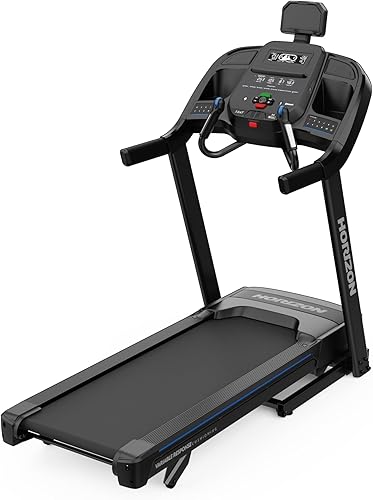
4. Horizon Fitness Treadmill: Best for direct Apple Watch connection
Horizon Fitness Treadmill: Best for direct Apple Watch connection
- Apple Watch and iPhone connection
- 0.5–12 MPH speed
- Up to 15% incline
- 20 x 60 in cushioned deck
Horizon Fitness is the clearest match for Apple users because it connects with Apple Watch and iPhone and works with fitness apps including Peloton, Strava and Zwift. Its 20 x 60 in deck suits longer running strides.
Pros
- Apple Watch and iPhone connection
- Largest deck here
- QuickDial speed and incline controls
Cons
- Heavier 257 lb frame
- Requires more floor space than compact picks
Horizon Fitness is the strongest choice for Apple users who want a clearly stated connection with Apple Watch and iPhone. It also works with fitness apps including Peloton, Strava and Zwift, which gives you more ways to train beyond Apple Fitness+.
The 20 x 60 in deck is the largest running surface in this group. Its 3-Zone Variable Response Cushioning is designed for the running area, and the treadmill reaches speeds from 0.5 to 12 MPH with incline up to 15%.
QuickDial controls allow faster speed and incline changes during a class. That matters when an instructor moves from a walk to a run or calls for a hill interval.
The 7.8 in LCD display is larger than the 5 in displays on several other picks. The treadmill also includes a power cord, safety key, tool kit and user manual.
Horizon lists a 257 lb item weight and a folded size of 44 x 35 x 68 in. Measure the storage area, doorway and ceiling clearance before choosing it for a small room.
Choose Horizon if Apple Watch and iPhone connection are your first priorities. Its larger deck and 12 MPH top speed also make it the better fit here for longer running sessions.
5. UMAY Fitness 20% Auto InclineTreadmill: Best for steep incline intervals
UMAY Fitness 20% Auto InclineTreadmill: Best for steep incline intervals
- 2–20% auto incline
- 0.6–8.0 MPH speed
- 400 lb capacity
- Touchscreen with workout metrics
UMAY stands out for its 20% auto incline, 400 lb capacity and touchscreen that tracks heart rate, speed, distance, time and calories. It suits Apple Fitness users who want hill-focused sessions.
Pros
- 20% auto incline
- 400 lb capacity
- Foldable frame
Cons
- 8 MPH top speed
- Apple Fitness compatibility is not stated
UMAY is the best match for Apple Fitness users who want steep incline work. Its auto incline runs from 2% to 20%, with 20 levels for hill intervals and climb-focused sessions.
The treadmill reaches 8 MPH and supports up to 400 lb. Its 4.0 hp motor is described as quiet, with operation below 45 dB, while the 44.1 in suspended running deck uses independent suspension and 7-layer shock absorption.
A touchscreen tracks heart rate, speed, distance, time and calories. Handrail controls keep those adjustments close during a workout, and the included safety key adds a basic safety step for home use.
The frame is foldable and uses hydraulic folding with transport wheels. UMAY states that the treadmill is 90% pre-assembled, but you should still plan a clear setup area and check the manual before the first session.
Apple Fitness compatibility is not stated for this model. Choose it when automatic incline and capacity matter more than direct Apple connection, and use your Apple device separately for the workout video.
6. Sunny Health & Fitness Smart Foldable Incline: Best for Bluetooth beginners
Sunny Health & Fitness Smart Foldable Incline: Best for Bluetooth beginners
- 0–12% auto incline
- Bluetooth connection
- 0–8 MPH speed
- SunnyFit app access
Sunny Health & Fitness offers Bluetooth connection, 12 incline levels and a foldable frame at a smaller size. It fits beginners who follow Apple Fitness workouts on a nearby device and want simple speed changes.
Pros
- Bluetooth connection
- 12% auto incline
- Soft hydraulic folding
Cons
- Shortest deck here
- Apple Fitness compatibility is not stated
Sunny Health & Fitness is a practical choice for beginners who want Bluetooth connection, simple speed buttons and a folding frame. It reaches 8 MPH and offers 12 incline levels from 0% to 12%.
The 48.8 x 16.5 in deck is the shortest and narrowest among these full treadmill options. It can suit walking and shorter jogging sessions, but taller runners should compare the deck length with their stride before choosing it.
Quick speed buttons provide access to 2, 4, 6 and 8 MPH. The LCD display is 5 in, and the treadmill includes pulse sensors along with a soft hydraulic drop mechanism for folding.
Sunny Health & Fitness lists Bluetooth connection and access to the SunnyFit app. It also includes lubricant, a safety key and a user manual.
Apple Fitness compatibility is not stated for this model. Choose Sunny when you plan to follow Apple Fitness workouts on a nearby device and want a smaller machine with automatic incline.
How should you choose a treadmill for Apple Fitness workouts?
Choose the treadmill by connection type first, then compare the deck, speed, incline and storage needs. A treadmill that pairs with Apple Watch or iPhone can simplify tracking, while a treadmill with a holder may be enough if you control the machine manually.
Should you prioritize Apple device connection?
Yes, if you want workout data to move between the treadmill and Apple devices. Horizon specifically lists Apple Watch and iPhone connection, while NordicTrack and ProForm list Apple Health syncing through iFIT.
CURSOR, UMAY and Sunny may still work well with Apple Fitness as exercise surfaces, but their information does not state direct Apple Fitness compatibility. With these models, you should expect to start the workout on your Apple device and adjust the treadmill yourself.
For more tracking options, see our guide to the Best Fitness Tracker For Treadmill Running.
What deck size works for Apple Fitness+?
A 20 x 60 in deck gives the most room in this group, while a 15 x 37.5 in belt is better suited to compact walking workouts. Match deck length to your stride and the fastest pace you plan to use.
NordicTrack and ProForm both use 55 in decks. Horizon gives you 60 in, while Sunny uses a 48.8 in deck.
CURSOR is the most compact, but its 37.5 in belt leaves less room for longer strides.
How much incline do you need?
Choose 0–10% incline for general Apple Fitness walking, jogging and running workouts. Choose Horizon or UMAY when you want a higher hill range, with Horizon reaching 15% and UMAY reaching 20%.
The incline system also matters. NordicTrack, ProForm, Horizon, UMAY and Sunny list automatic incline, while CURSOR uses a manual incline.
Manual adjustment can work well for planned sessions, but it requires you to pause or step off when changing levels.
Is a foldable treadmill better for Apple Fitness?
A foldable treadmill is better when you need to clear the room after class. NordicTrack, ProForm, CURSOR, UMAY and Sunny all list folding designs, while Horizon lists a folded size that still needs substantial storage space.
Measure the treadmill's operating footprint, folded footprint, doorway and storage area. Keep the device you use for Apple Fitness visible while exercising, and leave enough clearance to step on and off safely.
Can another app replace Apple Fitness+?
Yes. Some treadmills connect with other fitness platforms, which may be useful if your training changes.
Horizon lists Peloton, Strava and Zwift compatibility, while NordicTrack and ProForm center their connected features on iFIT.
If you also use Peloton classes, compare our guide to the Best Treadmills to Use with the Peloton App. For Bluetooth-focused choices, see the Best Bluetooth Treadmill roundup.
How do you set up and care for a treadmill used with Apple Fitness?
Place the treadmill on a stable, level surface and check that the walking area has enough room before starting a class. Keep the power cord clear of the belt and away from foot traffic, and follow the manual for assembly, safety key use, folding and lubrication.
Leave extra clearance at the front, sides and behind the machine. That space helps with mounting and dismounting, and keeps furniture, cables and other trip hazards away from the belt.
Keep your Apple device where you can see the instructor without looking down at the belt. A shelf, holder or nearby stand works well, but make sure the screen stays still and you can reach the controls without twisting.
Start at a comfortable speed and increase pace gradually during the warm up. Use the handrails only when needed for balance, since holding them throughout a class can change your posture and make the workout less effective.
Check the safety key before each session and wear secure shoes suited to walking or running. Keep loose clothing away from the moving belt.
Wipe sweat from the console, handrails and frame after use with a clean, slightly damp cloth. Avoid letting moisture sit around buttons or the display, and dry the handrails so they do not become slippery.
Check the belt position, power cord and folding mechanism regularly. Look for cord fraying, stiffness in the folding system or any change in belt tracking, and stop using the treadmill if a control or safety feature does not work as expected.
Follow the lubrication and maintenance schedule in the manual for your specific model. Different treadmills have different requirements, so do not assume that a routine for one brand or size will suit another.
If your machine shows an error or will not start, troubleshooting steps may differ by brand. Our guide to How To Reset Vision Fitness Treadmill? explains one reset process, but it does not replace the manual for these models.
Keep the manual and any tool kit in a known place for later questions. A few minutes of checks before and after each Apple Fitness session can keep the treadmill steady, clean and ready for the next workout.
Which treadmill should you choose for Apple Fitness+?
Choose Horizon Fitness if Apple Watch and iPhone connection, a 20 x 60 in deck and a 12 MPH top speed matter most.
That pick suits Apple users who want the clearest link between the treadmill and their devices, plus the most running room in this group. The larger deck and higher top speed also help if you plan longer runs rather than mostly walking workouts.
Choose NordicTrack or ProForm if you want Apple Health syncing with iFIT speed and incline control. Both options reach 10 MPH with 0 to 10 percent incline, and their automatic changes can suit guided sessions where the pace shifts during a class.
The difference between those two comes down to deck width and room size. NordicTrack offers a 55 x 20 in deck, while ProForm uses a narrower 55 x 18 in deck, so the wider surface may feel more comfortable for faster running or for users who move more across the belt.
Pick CURSOR FITNESS for a compact, high-capacity walking treadmill. Its 400 lb capacity, foldable frame and manual incline up to 16 percent suit home walkers who need portability and capacity more than direct Apple connection.
Pick UMAY for 20 percent auto incline and hill focused training. Its 400 lb capacity and touchscreen metrics suit users who want steep intervals, but the 8 MPH top speed and the lack of stated Apple Fitness compatibility mean you will follow classes on a separate device.
Pick Sunny Health & Fitness for Bluetooth, simple controls and a smaller folding design. Its 48.8 x 16.5 in deck is the smallest here, so it fits beginners and shorter strides best, especially for walking and light jogging.
The best treadmill for Apple Fitness is the one that matches how you follow classes and how much room you have to use it. If Apple device connection is your priority, start with Horizon, and if automatic incline and app syncing matter more, compare the NordicTrack and ProForm options in detail.
Our top 3 picks at a glance
-
1
Best for iFIT and Apple Health users
NordicTrack T Series Treadmills for Home
9.7/10 our score
See it on Amazon -
2
Best for high-capacity walking workouts
CURSOR FITNESS 15%/16% Incline Treadmills for Home
9.6/10 our score
See it on Amazon -
3
Frequently asked questions
Can you use Apple Fitness+ with a treadmill?
Yes. You can follow Apple Fitness+ treadmill workouts on an iPhone, iPad or other supported Apple device while using a compatible treadmill manually.
Apple Fitness+ compatibility does not automatically mean the treadmill controls speed or incline, so check whether the model connects to Apple devices or only provides a surface for the workout.
What is the best treadmill for Apple Fitness workouts?
The Horizon Fitness Treadmill is the strongest match when Apple device connection matters because it connects with Apple Watch and iPhone. NordicTrack and ProForm are better choices if you also want iFIT controls and Apple Health syncing, while CURSOR, UMAY and Sunny suit users who operate the treadmill manually.
Does Apple Fitness+ control treadmill speed?
Apple Fitness+ workouts can guide your pace and incline, but treadmill control depends on the treadmill and app connection. Horizon lists Apple Watch and iPhone connection, while NordicTrack and ProForm list automatic controls through iFIT.
For other models here, plan to adjust speed and incline at the treadmill.
What treadmill features matter most for Apple Fitness+?
The most useful features are a stable deck, quick speed changes, a suitable incline range, a device holder or screen, and a connection that tracks your workout data. A 20 x 60 in deck gives more running room, while a foldable frame helps in smaller rooms.
Choose the feature that matches how you follow workouts.


