Does Zombies 5K Work on a Treadmill?
Yes, Zombies 5K works on a treadmill because the app uses your phone's motion sensors to track indoor walking and running. You do need to calibrate it first, and accuracy improves when you carry the phone in a steady, secure position.
On this page (10 sections)
- Does Zombies 5K work on a treadmill without GPS?
- How does Zombies 5K track distance indoors?
- Why is my distance wrong on a treadmill?
- How do you calibrate Zombies 5K for treadmill walking and running?
- Where should you put your phone during a Zombies 5K session?
- What treadmill features help with Zombies 5K training?
- How do you set up a treadmill session for Zombies 5K?
- Which treadmill suits a small space for Zombies 5K?
- Which treadmill suits faster Zombies 5K sessions?
- Does Zombies 5K work on a treadmill for Couch to 5K beginners?
Yes, Zombies 5K works on a treadmill because it does not rely on GPS. The app tracks your movement with your phone's sensors, so it can count indoor walks and runs once you calibrate it to your stride and pace.
That calibration step matters more than the treadmill brand. Zombies 5K is a separate training app from Zombies Run, with shorter guided sessions aimed at getting you to 5K.
It will work indoors, but you should check its distance against your treadmill display for the first few sessions.
Does Zombies 5K work on a treadmill without GPS?
Yes, it works without GPS, and that is why indoor use is possible. When GPS is unavailable, the app estimates distance from step movement detected by your phone.
You still get the story, audio prompts, and workout structure. What you lose is location mapping, outdoor route data, and GPS-based pace checks that rely on satellites.
Phone placement changes the estimate. A phone in a loose pocket will bounce and may count extra movement, while a stable armband or waist belt gives a cleaner signal.
Our guide to Can You Use Zombies Run On A Treadmill? covers the same indoor tracking idea for the longer app. Read it if you plan to use both apps on the same treadmill.
How does Zombies 5K track distance indoors?
The app builds an estimate from your steps and your calibrated stride. During setup, it asks you to walk or run a known distance so it can match sensor movement to treadmill speed.
If your treadmill speed changes a lot, the estimate can drift. Interval sessions mix walking and running, so calibration at one pace may not fit the other pace perfectly.
Keep your speed steady within each interval. Sudden speed changes make it harder for the app to match your steps to distance.
Compare the app reading with the treadmill console after each session. Note the gap at walking speed and at running speed, then recalibrate if the gap grows.
Why is my distance wrong on a treadmill?
Distance is usually wrong because of stride, phone position, or a speed change after calibration. The app cannot see the treadmill belt, so it has no direct way to know your true speed.
Check that the phone is secure and that calibration was done at a normal training pace. Also check whether you switched from walking to running without an update.
Treadmill displays also vary, so a mismatch does not always mean the app is wrong.
Use one reference consistently. If you want the app and console to agree, recalibrate until they stay close across a full session.
A related question asks Does Zombie Run Work On Treadmill? and follows the same sensor logic, so the fix is still calibration.
How do you calibrate Zombies 5K for treadmill walking and running?
Calibrate at the pace you will use most, and repeat the check when you change shoes or phone placement. Start with a brisk walk, because early Zombies 5K sessions include a lot of walking.
Run at a steady, controlled pace during the calibration step. Avoid speeding up to finish faster, since that teaches the app a stride you will not repeat in training.
Do the same check at a light running pace if you plan to run intervals. Two calibrations, one for walking and one for running, will not always be possible in the app, so pick the pace that covers most of your session.
Write down your treadmill speed and phone position. That note makes it easy to repeat the same setup next time.
Where should you put your phone during a Zombies 5K session?
Put your phone in a secure armband, waist belt, or tight pocket and keep it in the same place every session. Loose pockets create false bounces that can inflate distance.
An armband keeps the phone close to your arm movement, which matches running steps well. A waist belt keeps it steadier for walking, though it may read slightly less movement on arm swing.
Avoid holding the phone in your hand for a full session. Your arms move differently when you hold a phone, check the treadmill, or gesture at the console.
A holder on the treadmill is convenient for watching the screen, but it is a poor tracking position. The phone will not move with your body, so distance will be badly underestimated.
What treadmill features help with Zombies 5K training?
A treadmill helps when it lets you change speed quickly, hold a steady pace, and keep you safe during intervals. Zombies 5K prompts you to switch between walking and running, so speed control matters.
Incline can add effort without adding speed. That is useful when you want a harder session while keeping the same treadmill speed for app tracking.
Cushioning helps on longer indoor sessions, since you repeat the same belt surface. A wider belt also gives you room to step safely when you reach for controls.
Start with our Best Treadmill For Running guide if you want a broader look at speed, belt size, and cushioning. It helps you match the treadmill to the pace ranges Zombies 5K will ask for.
Does zombies 5k work on a treadmill with incline?
Yes, incline works fine because distance still comes from your steps, not from elevation. Incline changes effort and muscle use, but it does not break sensor tracking.
Keep speed the same when you add incline. That keeps calibration valid and lets you compare sessions fairly.
Use incline in short blocks, not as a constant setting. Zombies 5K already varies effort with walk and run intervals, so incline should support the session, not fight it.
The THERUN model above runs from 0.5 to 9 MPH, supports users up to 300 lb, and offers auto incline from 0% to 12%. Its 43.3 x 16.5 inch running area gives you space to move while you follow audio prompts.
That combination suits readers who want incline to add effort while the app tracks distance at a steady speed.
How do you set up a treadmill session for Zombies 5K?
Set up speed, phone position, and safety key before you start the app. Begin only once you are already walking at a steady pace.
Start at a comfortable walking speed, then run the calibration step. Keep the treadmill at that speed until the app confirms the setup.
Wear the safety key and keep the belt clear. Check the console with your eyes rather than reaching across the belt while audio prompts play.
Keep water within reach, since indoor sessions can feel hotter than outdoor runs.
For a wider view of indoor training, read What Are the Benefits of Running on a Treadmill? This explains why steady pacing helps beginners build a routine.
Which treadmill suits a small space for Zombies 5K?
A small space suits a foldable treadmill with a narrow footprint and a stable belt. You will use it in short sessions, so storage and quick setup matter as much as top speed.
Look for a belt wide enough for natural steps. A narrow belt makes interval changes feel less secure, even at walking speeds.
Check the folded size against your room before you buy. A treadmill that folds flat can slide under a bed or stand in a closet, but you need clear floor space to unfold it safely.
The ApexNexus model above folds to 46.5 x 22.8 x 5.5 inches and weighs 41 lb, which suits apartments and spare rooms. It runs from 0.6 to 6.2 MPH, supports up to 300 lb, and uses a 38 x 15 inch belt with six layer cushioning.
That slower top speed fits Zombies 5K walking and early running intervals, though faster runners will outgrow it.
Which treadmill suits faster Zombies 5K sessions?
A faster treadmill suits readers who already run comfortably and want headroom as fitness improves. Early Zombies 5K paces are modest, but progress can raise your normal running speed over time.
Look for a higher top speed, a larger motor, and a belt that stays stable at running pace. Those features matter more than a touchscreen when your main goal is interval training.
Check weight capacity against your body weight and gear. A margin above your current weight gives the motor less strain during repeated sessions.
Our roundup of Best Treadmill For 5K Training compares models by speed, cushioning, and space use. Use it to shortlist a treadmill that will still suit you after you finish the program.
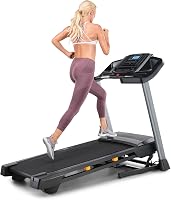
The NordicTrack T Series above reaches 12 MPH with 0 to 12% incline and SelectFlex cushioning you can adjust from soft to firm. It supports up to 325 lb and folds for storage, though it measures 75.1 x 34.3 x 58.4 inches when open.
That size and speed range suit readers who want a fuller running treadmill, not just a walking pad.
Does Zombies 5K work on a treadmill for Couch to 5K beginners?
Yes, it suits Couch to 5K beginners because the sessions start with walking and add running in short blocks. That structure matches a treadmill, where you can set each pace and repeat it exactly.
Keep early treadmill speeds low. A brisk walk that still allows conversation is a good test for the walking parts.
Use the rest prompts honestly. Treadmill training works best when you repeat the same walk and run pattern across several days.
Our guide to Best Treadmill For Couch To 5K helps you pick a model with the right belt width, speed range, and cushioning for that stage.
Pick a foldable manual incline model if space is tight, an auto incline model for hands free effort changes, or a higher speed model if you already run.
Frequently asked questions
Does Zombies 5K work on a treadmill?
Yes, it works indoors because it tracks motion from your phone instead of GPS. Carry the phone securely, calibrate your stride at your treadmill speed, and expect pace to vary slightly from the treadmill display.
Outdoor GPS data will not be available indoors.
Why is my Zombies 5K distance wrong on a treadmill?
Distance is wrong when stride length, phone position, or treadmill speed changes after calibration. Recalibrate at the pace you use most, keep the phone in the same place, and check the treadmill display against the app after each session to spot drift early.
Can I use Zombies Run and Zombies 5K on the same treadmill?
Yes, both apps track indoor motion the same way, but Zombies 5K is built around short structured training sessions. Compare the two formats in our guide to whether you can use Zombies Run on a treadmill before you switch apps.
What treadmill speed should I use for Zombies 5K?
Use the walk and run speeds the app prompts for, then calibrate at that speed. Most beginners alternate brisk walking with short running intervals, so set the treadmill so walking feels easy and running feels controlled, not rushed.